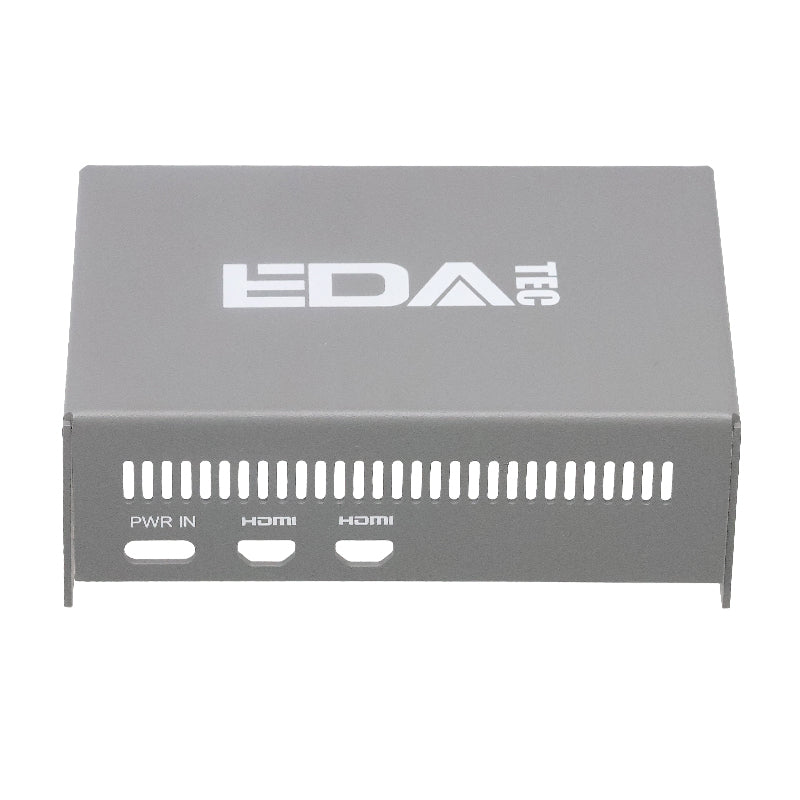


EDATEC Raspberry Pi 5 HAT Metal Case
EDATEC Raspberry Pi 5 HAT Metal Case
SKU:123004105
Out of stock — Available on backorder
Couldn't load pickup availability
For a simpler Pi 5 case without M.2 HAT+ support, see the Open Aluminium Case or Aluminium CNC Box.
This listing is for the ED-Pi5Case-EXT: metal case for the Raspberry Pi 5 with built-in support for the Raspberry Pi M.2 HAT+ and Active Cooler. Contact us if you have questions about compatibility.
The ED-Pi5Case-EXT is a fully enclosed metal case for the Raspberry Pi 5, purpose-built to accommodate the Raspberry Pi 5 together with the Raspberry Pi M.2 HAT+ and Raspberry Pi Active Cooler in a single tidy enclosure -- making it the ideal case for Pi 5 builds that include NVMe SSD storage. Constructed with a powder-sprayed sheet metal top cover and aluminium profile bottom cover, both panels thermally couple to the Raspberry Pi 5 via thermal pads for passive cooling. All main interfaces remain fully accessible -- HDMI, Ethernet, USB, SD card, the ON/OFF button, and PWR/ACT indicators -- and dedicated camera cable slots and mounting holes allow the Raspberry Pi Camera Module to be integrated directly into the case. Suitable for commercial and industrial deployments requiring a clean, all-metal enclosure with expanded storage capability.
Key Features
- Compatible with: Raspberry Pi 5, Raspberry Pi M.2 HAT+, and Raspberry Pi Active Cooler
- Construction: Sheet metal (powder-sprayed top cover) + aluminium profile bottom cover
- Cooling: Passive cooling via thermal pads on both top and bottom covers -- reduces AI Kit module temperature by ~20°C and reduces CPU temperature fluctuation
- M.2 HAT+ Support: Built-in space for Raspberry Pi M.2 HAT+ -- ideal for NVMe SSD or other M.2 peripherals
- Active Cooler Support: Compatible with Raspberry Pi Active Cooler installation
- Camera Integration: Reserved camera cable slots and mounting holes for Raspberry Pi Camera modules
- Full Port Access: HDMI, Ethernet, USB, SD card, ON/OFF button, and PWR/ACT indicator all accessible
- Dimensions: 91 x 61 x 33mm
- Enclosure Type: Fully enclosed -- all-metal design suitable for commercial and industrial environments
Specifications
| Category | Details |
|---|---|
| Compatible Hardware | Raspberry Pi 5, Raspberry Pi M.2 HAT+, Raspberry Pi Active Cooler |
| Top Cover Material | Sheet metal, powder-sprayed finish |
| Bottom Cover Material | Aluminium profile |
| Dimensions | 91 x 61 x 33mm |
| Cooling Type | Passive (fanless); thermal pads on top and bottom covers |
| Cooling Performance | Reduces Raspberry Pi AI Kit (Hailo module) temperature by ~20°C (93.1°C → 73.3°C at 25°C ambient, full CPU + Hailo load); also reduces CPU temperature fluctuation |
| M.2 HAT+ Support | Yes -- accommodates Raspberry Pi M.2 HAT+ (M.2 2230/2242 NVMe SSD) |
| Active Cooler Support | Yes -- compatible with Raspberry Pi Active Cooler |
| Camera Support | Yes -- reserved cable slots and mounting holes for Raspberry Pi Camera |
| Accessible Ports | HDMI, Ethernet, USB, Micro SD card, ON/OFF button, PWR/ACT indicator |
Installation Notes
- Remove the white protective paper from the thermal silicone in both covers before installing.
- If the Raspberry Pi AI Kit is installed, ensure the thermal silicone in the top cover makes full contact with the Hailo IC.
- Pass the FPC cable from the Raspberry Pi Camera through the pre-drilled hole on the top cover, then secure the camera to the outside of the top cover using 2x M2×H8 cylindrical sleeves and 2x M2×12 screws.
- Install the Raspberry Pi Active Cooler on the Raspberry Pi 5.
- Connect the 40-Pin connector to the 40-Pin port on the Raspberry Pi 5.
- Connect the Raspberry Pi M.2 HAT+ to the Raspberry Pi 5 via the 40-Pin connector and plug the PCIe cable into the PCIe port of the Raspberry Pi 5.
- Place the Raspberry Pi 5 on the bottom cover and align the screw holes. Place 4x M2.5×H15 cylindrical sleeves on the screw holes between the Pi 5 and the M.2 HAT+, then insert 4x M2.5×21 screws through the HAT and tighten clockwise to secure the assembly to the bottom cover.
- Plug the Camera FPC cable into the CAM/DISP port on the Raspberry Pi 5.
- Place the top cover over the bottom cover, align the screw holes, insert 4x M2.5×4 screws, and tighten clockwise.
- Use the included tweezers to insert and remove the SD card after assembly.
Note: The 40-Pin connector, Raspberry Pi 5, Active Cooler, M.2 HAT+, Camera Module, and SD card are not included. Refer to raspberrypi.com for assembly instructions for the Active Cooler, M.2 HAT+, and Camera Module.
What's in the Box
- 1x ED-Pi5Case-EXT Top Cover (with pre-installed thermal silicone)
- 1x ED-Pi5Case-EXT Bottom Cover (with pre-installed thermal silicone)
- 1x Accessory Set: 2x M2×H8 cylindrical sleeves, 2x M2×12 screws, 4x M2.5×21 screws, 4x M2.5×4 screws, 4x M2.5×H15 cylindrical sleeves, 1x pair of tweezers
Note: Raspberry Pi 5, Raspberry Pi M.2 HAT+, Raspberry Pi Active Cooler, M.2 SSD, camera modules, and SD card are not included.
Technical Documents
HDMI is a trademark or registered trademark of HDMI Licensing Administrator, Inc. Bluetooth is a registered trademark of Bluetooth SIG, Inc. Wi-Fi is a registered trademark of Wi-Fi Alliance. USB-C is a registered trademark of USB Implementers Forum. MCCI and MCCI Catena are registered trademarks of MCCI Corporation. All other trademarks are the property of their respective owners.